Blog for oracle Apps Training ( Copyright Protected )
Wednesday, November 15, 2006
Case insensitive query in Oracle Apps
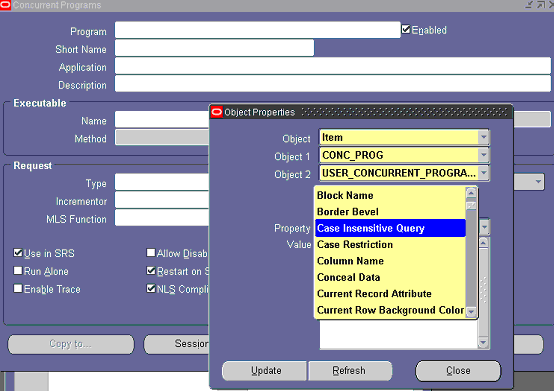
This is response to a question posted by a comment in Article..Why Is it Called Apps Click on the field in question, and click on Help/Diagnostic/Properties/Item
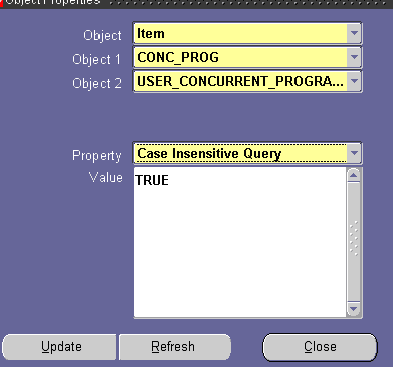
In the property field, select case insensitive query
If the value is TRUE, then you will know that Case Insensitive Query is possible on this field.
I am now confused as we can make "Case Insensitive query" in two ways..through Object properties and Forms Personalization.. Whats the difference I will get by implementing these two methods??
I am new to oracle Apps. You told to set profile option "utilities:diagnostics" to yes against user name. but i could not find this option. can you please tell the steps how to set up this option.
Hi Anil Thanks for the tip..Its a good one. I have another clarification. I need to do Forms Personalization in a form where records are displayed only if Ctrl+F11 is used. I need to trap this status of the form and also add a condition. This is in AR, Receipts-->Remittances, Enter bank details and click Manual Create. No rows are displayed. But if press Ctrl+F11, all the receipts for the bank are displayed. I need to restrict this to the reciepts of the user. Pl help.
Hi Anil Thanks for the tip..Its a good one. I have another clarification. I need to do Forms Personalization in a form where records are displayed only if Ctrl+F11 is used. I need to trap this status of the form and also add a condition. This is in AR, Receipts-->Remittances, Enter bank details and click Manual Create. No rows are displayed. But if press Ctrl+F11, all the receipts for the bank are displayed. I need to restrict this to the reciepts of the user. Pl help.
Hi Anil Thanks for the tip..Its a good one. I have another clarification. I need to do Forms Personalization in a form where records are displayed only if Ctrl+F11 is used. I need to trap this status of the form and also add a condition. This is in AR, Receipts-->Remittances, Enter bank details and click Manual Create. No rows are displayed. But if press Ctrl+F11, all the receipts for the bank are displayed. I need to restrict this to the reciepts of the user. Pl help.
Hi Anil Thanks for the tip..Its a good one. I have another clarification. I need to do Forms Personalization in a form where records are displayed only if Ctrl+F11 is used. I need to trap this status of the form and also add a condition. This is in AR, Receipts-->Remittances, Enter bank details and click Manual Create. No rows are displayed. But if press Ctrl+F11, all the receipts for the bank are displayed. I need to restrict this to the reciepts of the user. Pl help.
Hi Anil, I read in one article that customers name should be in uppercase to facilitate easy inquiry of customers, when in fact based on this article, we can set to query case insensitive forms. any comment on this.

hi Anil,
ReplyDeleteI after 10 years of Oracle development, now trying to get into apps for that your site is really helping me.
Now back to the post- When I try to Help/Diagnostic/Properties/Item
I get an alert asking for Oracle password?
Thanks!
Please set profile option "Utilities:Diagnostics" to Yes against your user name
ReplyDeleteThanks
Anil
Hi Anil..
ReplyDeleteI am now confused as we can make "Case Insensitive query" in two ways..through Object properties and Forms Personalization..
Whats the difference I will get by implementing these two methods??
you should use forms personalization to achieve this only when you are modifying an existing Oracle apps form.
ReplyDeleteYou the forms builder when you are building the screen from scratch
thanks
anil passi
Hi Anil,
ReplyDeleteI am new to oracle Apps. You told to set profile option "utilities:diagnostics" to yes against user name. but i could not find this option. can you please tell the steps how to set up this option.
Thanks
hi anonymous
ReplyDeleteName of the profile option is "Utilities:Diagnostics"
do this
1. go to system administrator
2. click on profile
3. search for this profile against your username
4. set to Yes
thaks
anil
Hi Anil
ReplyDeleteThanx for this information
Hi Anil
ReplyDeleteThanks for the tip..Its a good one.
I have another clarification. I need to do Forms Personalization in a form where records are displayed only if Ctrl+F11 is used. I need to trap this status of the form and also add a condition.
This is in AR,
Receipts-->Remittances, Enter bank details and click Manual Create. No rows are displayed. But if press Ctrl+F11, all the receipts for the bank are displayed. I need to restrict this to the reciepts of the user.
Pl help.
Regards
Anita
Hi Anil
ReplyDeleteThanks for the tip..Its a good one.
I have another clarification. I need to do Forms Personalization in a form where records are displayed only if Ctrl+F11 is used. I need to trap this status of the form and also add a condition.
This is in AR,
Receipts-->Remittances, Enter bank details and click Manual Create. No rows are displayed. But if press Ctrl+F11, all the receipts for the bank are displayed. I need to restrict this to the reciepts of the user.
Pl help.
Regards
Anita
Hi Anil
ReplyDeleteThanks for the tip..Its a good one.
I have another clarification. I need to do Forms Personalization in a form where records are displayed only if Ctrl+F11 is used. I need to trap this status of the form and also add a condition.
This is in AR,
Receipts-->Remittances, Enter bank details and click Manual Create. No rows are displayed. But if press Ctrl+F11, all the receipts for the bank are displayed. I need to restrict this to the reciepts of the user.
Pl help.
Thanks
Hi Anil
ReplyDeleteThanks for the tip..Its a good one.
I have another clarification. I need to do Forms Personalization in a form where records are displayed only if Ctrl+F11 is used. I need to trap this status of the form and also add a condition.
This is in AR,
Receipts-->Remittances, Enter bank details and click Manual Create. No rows are displayed. But if press Ctrl+F11, all the receipts for the bank are displayed. I need to restrict this to the reciepts of the user.
Pl help.
Thanks in advance
Hi Anil,
ReplyDeleteWill you please tell me how to attach the AP Remittance Advice workflow to the Oralce Payment.
Thanks,
Durai S E
hi anil,
ReplyDeletei want to become good functional+technical consultant....
but how can u reach this position....give me best suggition?
Hi Anil,
ReplyDeleteI read in one article that customers name should be in uppercase to facilitate easy inquiry of customers, when in fact based on this article, we can set to query case insensitive forms. any comment on this.
thanks,
adrian
previous post is really good and helped me!
ReplyDelete