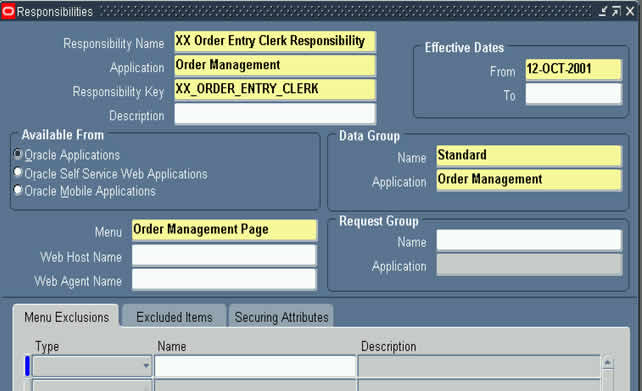
Firstly, lets define the responsibility for Clerk, as we discussed in Article.
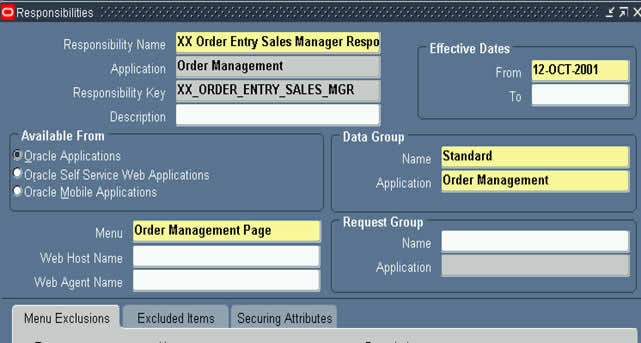
Next, lets define the sales manager responsibility, as we discussed in Article.
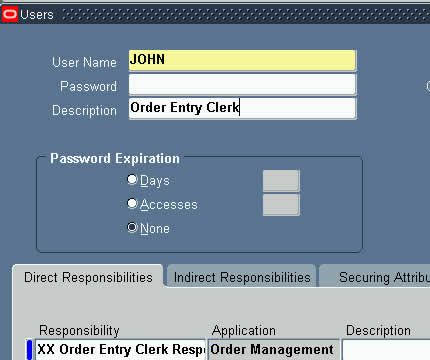
Lets define user JOHN, that is Clerk
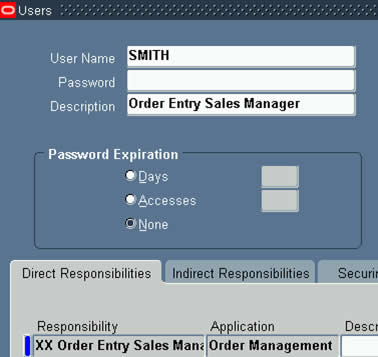
And also, lets define user SMITH ( Sales manager )
Now, we need to define the profile option for discount, hence go to responsibility "Application Developer"

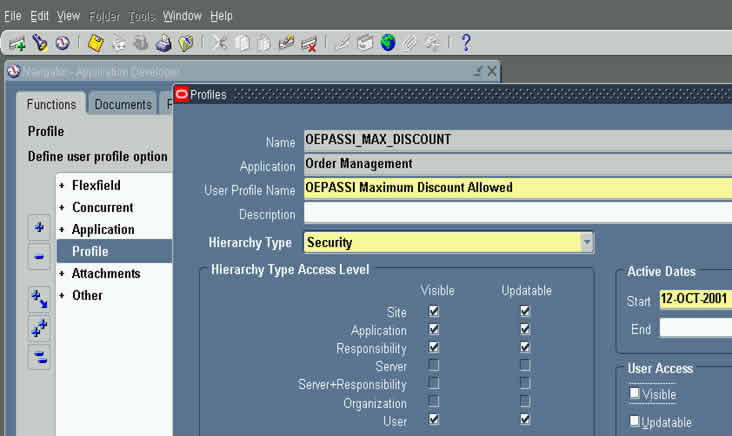
When you click on menu "Profile" above, you will then see below screen for defining profile option. Please note that the "Name" field is the short name of profile option, and it is this name used in API call to FND_PROFILE.value
Now, after having defined a profile option, its time to assign these to JOHN & SMITH.
Hence go to responsibility "System Administrator"
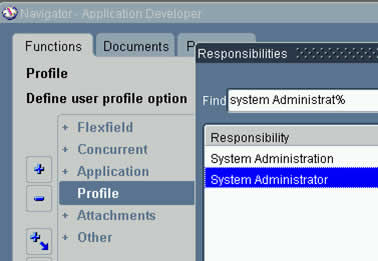
Click on Menu Profile/System, as below

The profile option assignment screen looks like below. Enter JOHN in USER, OEPASSI% in Profile, to select profile named "OEPASSI Maximum Discount Allowed"

Assign a value of 5 to the user.

Click on torch, to return to search screen as below

and this time we will assign value of 15 against user SMITH.

OK, what if we have too many clerks, we can also simply assign profile value to Responsibility of Clerk. Doing so, all the users that use this responsibility, will inherit profile option value against Responsibility.
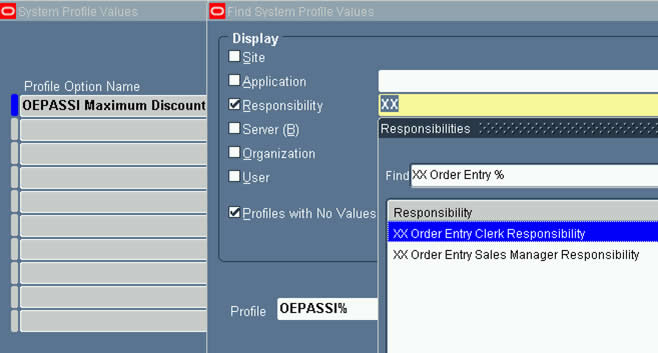
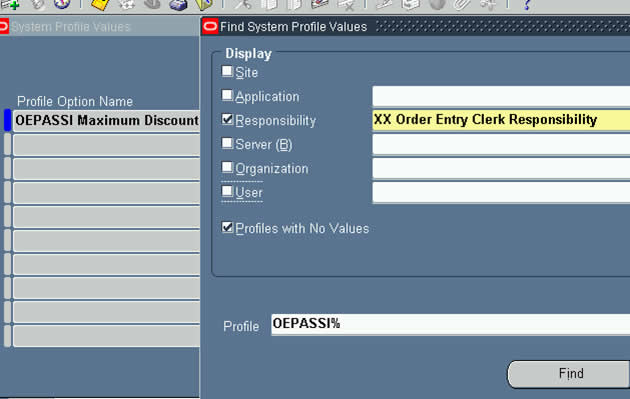
Assign 5% max discount for Clerks

Now, lets select Sales Manager responsibility in profile screen

Search on this...as below......
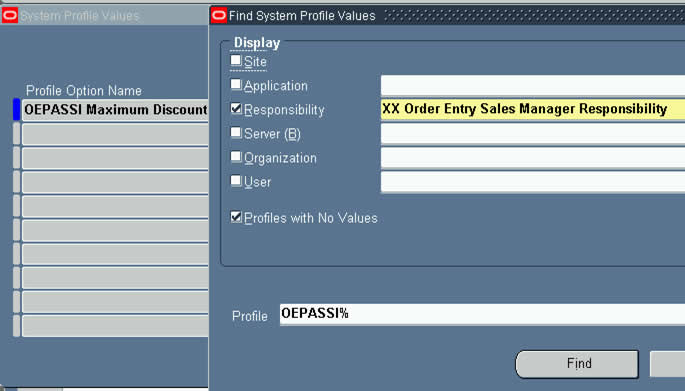
Assign value 15% to Sales Manager responsibility.

That's it for setup.
Any questions? leave your question by click on link Leave Comment for this article
Thanks
Anil Passi
u really make things so easy to understand....
ReplyDeletethanks a ton!
regards,
viplendra
Just WOW . Spend ann hour today looking at your postings . You are GREAT. Thanks for sharing
ReplyDeleteArtur bakhtriger
Spend about 2 hrs today looking at your postings. They are so informative . Thank you so much for doing this great job
ReplyDeleteArtur Bakhtriger
THANKS A TON!
ReplyDeleteSANDY
HI
ReplyDeleteCould you le me know which version of Apps do these screen shots belong?
Ritz
Hi Ritz
ReplyDeletethis is from 11.5.10
thanks
anil
Hi Anil,
ReplyDeleteI am spending lot of time on this site you have made things so clear its very easy to understand.
thanks
Muskan
Hi Muskan
ReplyDeleteGood to hear that this site is helping you.
Thanks,
Anil
Thats nice.
ReplyDelete"Profile options" well described.
Thanks a ton :)
Thanks a lot, I was about to search on metalink when I decided to google it and I found here how to create a custom profile option and use it.
ReplyDeleteShakir.
hi ANIL u site is simply gr8....i have a doubt ,when i give fnd_profile.value to a profile which has value at user level it is not returning anything but if i give a site level value it is returning that......i need to return the value at user level...plz help.......JITIN
ReplyDeleteAmazingly explained!!!!
ReplyDeleteBut i have one doubt, when ever we access profile values using the code fnd_profile(),from where does the code related to the function gets executed? will the API's reside in any of the library files?
hi mani
ReplyDeletefnd_profile that I was refering to is a plsql package. the api looks at a table named fnd_profile_option_values to return the profile value for the current login session.
as soon as you login, global variables in a package named fnd_global are set to reflect your user_id, responsibility_id etc.
fnd_profile.value uses a combination of above info to return a value.
PS: Fnd_profile api does caching too, for efficiency purpooses.
thanks
anil
Finally this time i understood the profile options concept.. after reading many docs..
ReplyDeleteThanks a lot..
its really helping too much
Hi Anil,
ReplyDeleteA wonderful site I must say, even after working for more then a year in Apps I was not confident enough, your site helped me a lot.
Regards,
Nitin Guru
Hi Anil ,
ReplyDeleteThanks a lot for making such a wonderful blog on Oracle applications.
Regards
Ankit
Hi! Anil
ReplyDeleteI have recently started studing oracle apps. n material here in this blog is quite interesting n helpful.......
so plz keep doing social service
Salman
Hi Anil,
ReplyDeleteA wonderful site I must say, i got more valuable information from these docs ... i never forget ur help.
Keep up the good work.
Regards,
Lakshmi Narayana Jillellamudi
Hi anil,
ReplyDeleteIm a beginner in oracle apps technical consultant. I found ur site very helpful. Can u suggest the ways i know the GL module
Hi im a beginner i found your site very useful. Suggest some steps to learn customising forms from template.fmb
ReplyDeleteRegards
madhu
Hi Anil,
ReplyDeleteI have no words to appriciate u.what a good job u r doing.
Bharat
Hi Anil,
ReplyDeleteExplained profile options setup very well. Its easy to understand and very useful. Thanks.
regards
J.Siva Kumar
Hi Anil,
ReplyDeleteGreat Job ! Thanks a ton !
Regards,
Nisarg
Hi Anil,
ReplyDeleteThanks a lot for posting wonderful articles like this.I was using these features but was not too much confident.
Can you please give some example of profiles setting at server,site and application level.
I think that printer configuration etc can be done at site level.
Keep up the good work.
Rgds,
Debashis
Hi Anil,
ReplyDeleteI am beginner for Oracle Apps. Thanks alot for your valuable information.
Amazing article...Its so simple to understand...Terrific job Anil....
ReplyDeleteHi Anil:
ReplyDeleteThanks a lot for spending time in helping others, your help is greatly appreciated!! Can you help us in working on about BPEL process and for what it is used in real-time!! Thanks again!!!
Radhika Menon
Hi Radhika
ReplyDeleteBPEL will replace Oracle Workflows in Fusion. It is on my agenda to write about BPEL too.
Thanks,
Anil
hi Anil,
ReplyDeleteWe are implementing ORACLE EBS in Cairo EGYPT that has PO INV GL AP FA....I am working as System Analyst and the Modules will be live in few days.
One Q ..my consultants were saying that we cannot define our own profile.through Application Developer Resp.is it true ???
IF NO then "in ur article about PROFILE how u used XXpassi Profile.
kindly explain
Hi DK
ReplyDeleteYes, you can create profile options from Application Developer, infact that is the only responsibility that allows creation of Profile Options.........
Thanks,
Anil
Hi Anil,
ReplyDeleteFound your site.. its really so easy to follow what u describe...
Profile option till now was a mystery for me... u made me atleast have a starting understanding of the same..
great help ...
Thanks..
Ashish
The word is fantastic.
ReplyDeleteAnil Bhan
Fanatis job Anil.I have been following your postins for a long time.
ReplyDeleteAnil Bhan
Hi Anil,
ReplyDeleteI am new to oracle Apps.Can you explain me the difference between user profile,security profile and system profile with examples ???
thanks for having come with such a useful site.
regards,
farha
it is very clear and useful. Thanks
ReplyDeleteHi Anil
ReplyDeleteThank you very much for sharing your knowledge and helping us to know more about Oracle Apps.
Thanks
Mitali
Hello Anil
ReplyDeleteYou are amazing man!!!
By the way i was going through Profile Options..You said with out adding the Application Developer Responsibility we wont be getting that option called profile options under Application..
But when i was trying to define that responsibility it says "Application Developer is already in use.Please select a unique name".It doesn't make sense to me at all..If i have that responsibility why is it not showing Profile under application?? FYI: I have System Administrator and Order Management Responsibilities..Appreciate Your Help..Thanks!!
IF Oracle Apps was a religion
ReplyDeleteTHEN Anil would have been God!
Hi Anil,
ReplyDeleteyou are simply great. i have never seen such a nice explaination of anything.
Please keep your good work up.
thanks,
Regards,
Anshul singhal
u r great
ReplyDeleteHi Anil,
ReplyDeleteFantastic work...just to understand this profile option i have tried going thru so many books and articles...they are either overloaded with information else dont cover what is most essential...it was really gr8 going thru ur article...keep up the good work..
Thanks..
ag
Hi Anil,
ReplyDeleteFantastic work...just to understand this profile option i have tried going thru so many books and articles...they are either overloaded with information else dont cover what is most essential...it was really gr8 going thru ur article...keep up the good work..
Thanks..
ag
Hi Anil,
ReplyDeleteWhen we go to Help -> Diagnostics,
in Apps, we find two things
$PROFILE$
and
PROFILE OPTIONS
What do they indicate?
Thanks in advance.
Hi A
ReplyDeleteIn Help/Diagnostics/Examine, the block name $PROFILE$ caches the profile option values at the Form Startup for that user session.
Hence you can select BLOCK=$PROFILE$ and FIELD=PROFILE OPTION SHORT NAME
And hence the profile option value for that screen session will be shown in value field.
Thanks
Anil
Great Work yar. Your are awesome. I really appreciate your effort on this.
ReplyDeletegud work keep it up!!!
ReplyDeleteHi Anil
ReplyDeleteReally this site is useful a lot.
One doubt When u were creating a profile u said for Clerk 5 and Smith 15, these values will be provided by whom?
What are these values?
Could you please explain?
Regards,
Pradeep.
Anil,
ReplyDeletedone a great job.
regards
kalpana
Hi,
ReplyDeleteThanks a lot.
Good work. Keep it up.
Babu
http://babudba.blogspot.com
hi anil,
ReplyDeleteall this days i was like confussed abt the concept of Profile but this article made me so clear with the concepts.
Thanks...god bless!!
Hi,
ReplyDeleteWat happens in a responsibility say clerk, Some clerks have the discount of 7.0 and some has 5.0?..
How can we do the profile option here?
Thanks a lot Anil, May Allah grant your the best of knowledge and its merits and guide you to what is right, Aameen. - Faisal
ReplyDeleteHi Anil,
ReplyDeleteIts a very nice explanation of profile options and extremely helpful material. I have a question, lets say I want to use a profile option directly in the Parameter form. Eg, I'll pass the OU name in the parameter, and for that I've a query and the org_id would be passed as parameter in it. How can I achieve it?
Regards,
Debanjan
hi anil,
ReplyDeleteAm a beginner in oracle apps functional consultant. please update about eAM module in your blog.
Thanks
Dinesh
Thank you very much ....This site is really helpful!!
ReplyDeleteSrikanth
Hi anil,
ReplyDeleteI have just started to work in Apps AP module.
I want to learn oracle Apps.
please give me some advice to start.
Thanks
Yogesh
Hi Anil, Thanks a lot for a nice explanation.
ReplyDeleteRegards
Kumar
Hi Anil,
ReplyDeletethanks a lot for a nice explanation
Regards
Kumar
Hi Anil,
ReplyDeleteGreat explanation.
Thanks
Kumar
Thanks Anil,
ReplyDeleteU made it so easy.. i will go through your blog completely.. Hope to find more setups with screenshot.
Thanks
Nabil
You r really great Anil!!
ReplyDeleteThanks a lot!!
Shree
You r simply great Anil!!
ReplyDeleteThanks a lot!!
Shree
Its really great.thanks a lot
ReplyDeletesanjeet
You are simply geneous
ReplyDeleteU r simply geneous....
ReplyDeletehi Anil,
ReplyDeletei have created one responsibility and assign only reports ,contains custom reports.and also created few users (suppose Mr. xx and Mr. yy and assigned the same responsibility to them but Mr. can see only his own request report but Mr. xx can see his report and also run by Mr.YY , i want to restrict Mr. XX to not allowed to see other users report
hi Anil,
ReplyDeletei have created one responsibility and assign only reports ,contains custom reports.and also created few users (suppose Mr. xx and Mr. yy and assigned the same responsibility to them but Mr. can see only his own request report but Mr. xx can see his report and also run by Mr.YY , i want to restrict Mr. XX to not allowed to see other users report
hi anil,
ReplyDeleteYour site is excellent. Keep on going good works. I appreciate ur work and patience. I have one query.... I have been working in Application for the last 2 years. Could you pls update me about "EAM" Module in your blog.
Thanks
A Radhakrishnan
hi anil,
ReplyDeleteYour site is excellent. Keep on going good works. I appreciate ur work and patience. I have one query.... I have been working in Application for the last 2 years. Could you pls update me about "EAM" Module in your blog.
Thanks
A Radhakrishnan
Hi Anil,
ReplyDeleteExcellent posting..Can you also explain what does setting profiles at site, server, and organization level mean? Thank you
Regards,
Sandeep
Hi Anil,
ReplyDeleteHow you doing?I am new to Oracle Apps and your blog.I can say that
You are simply Superb....you made
technology so simple I can say.
this is simply superb..u hv actualy made me understand the concepts...too good..
ReplyDeleteHi Anil
ReplyDeleteThanks for your posting and Could you let me know which version of Apps they are currently using and also the all the versions of the Oracle Apps
Could you let me know all the versions of Apps they used
ReplyDeleteHi Anil
ReplyDeleteReally a great work and easy to learn for the begineers
And Why do u we need Profile Option Name and User Profile Name
ReplyDeleteThanks a Ton Anil...
ReplyDeleteArticles are just so ready to be understood...
Great!!! Keep up the Good Work!!!
This is really useful article... I just want to understand.. If i define profile option at user level and application level both.. then fnd_profile will pick which value ?
ReplyDeleteHi Anil,
ReplyDeleteI have just started learning OraApps.
As I am new to the field, often I am not able to find the path to open the screen. Like to open Responsibility screen which Responsibility should be used and how to navigate.
Is there any simpler way to solve this silly problem. It kills half of my time in searching for the screen. :(
You are doing a gr8 job. God bless you.
Thanks.
it is very easy to understand. Thanks to Mr. Anil> it is very useful to Beginers like me Thanks alot
ReplyDeleteSrinivas.P
Hi Anil,
ReplyDeleteThis is really helpful for me to understand the relation between the profile, user, and responsibility. The most valid point here is "Profile is a Global variable". It cleared my hundred questions that had in my mind before started reading this.
I have one more question what is the relation between ROLE and RESPONSIBILITY? Both feel same to me. Is the role like previlege and responsibility like role in the DB concepts?
Regards
Khaleel
Hi,
ReplyDeleteThis is really helpful for me to understand the relationship between USER, RESPONSIBILITY, AND PROFILE. The valid point here is Profile is a Global variable.
Thanks a ton.
Cheers
Khaleel
Thanks Anil for excellent work around on profile options.
ReplyDeleteDear Anil,
ReplyDeleteThanks for the information on Profiles..
In the Screen Shots of creating responsibilites and assigning the concerned profiles to the manager and clerk, It was shown how a profile should be created. But can you please tell me where that coding part has to be written for that 5% and 15% while creating the profile.. Could you please provide the screen shots for the same.
If possible kindly provide me some material for the Bigginers.
Thanks in advance Anil.
Warm Regards,
HARI
Sorry Anil I for got to give my email ID it is hari417ece@gmail.com
ReplyDeleteRegards,
HARI
very excellent
ReplyDeleteAwesome dudee!!
ReplyDeletehi Anil,
ReplyDeletei am new to oracle apps, i understood the concept.
Can you please explain where the link is defined for the particular field (for example the discount field in order entry screen)
you have shown the profile name ,user/responsiblity against the value(5/15) but how it restricts the particular field in order entry screen
Thank you
Ram.G
Anil you are Angel
ReplyDeleteHi Anil,
ReplyDeleteReally nice explanation and I have a small question regarding profile options.How do I know the max discount value? If I enter any value in the discount value column,how it can be showed an error.You already said that code and all,but what is the exact max permissible value of that particular column.Can you give the solution for this question.
Thanks in Advance...
Mani
Hi Anil,
ReplyDeleteReally nice explanation and I have a small question regarding profile options.How do I know the max discount value? If I enter any value in the discount value column,how it can be showed an error.You already said that code and all,but what is the exact max permissible value of that particular column.Can you give the solution for this question.
Thanks in Advance...
Mani
Thank you.. :)
ReplyDelete